
Volkswagen Golf Mk7 Owners Manual: Changing gear using Tiptronic
Fig. 138 shows the selector lever in the Tiptronic position, and Fig. 139 shows the steering wheel paddles used for the same function on equipped Volkswagen Golf Mk7 models. This page explains how to shift gears manually through Tiptronic using either the lever or the paddles.
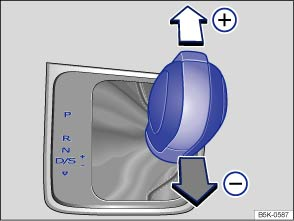
Fig. 138 Selector lever in Tiptronic position (left-hand drive). The controls are mirrored for right-hand drive vehicles
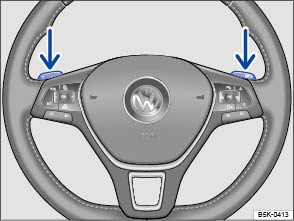
Fig. 139 Steering wheel with two paddles for Tiptronic
 First read and observe the introductory information
and safety warnings
First read and observe the introductory information
and safety warnings Using Tiptronic, the gears can be shifted up and down manually in an automatic gearbox. The gear that is currently selected will be maintained when the Tiptronic programme is selected. This remains the case until the system does not perform a gear change due to the current driving situation.
Operating Tiptronic with the selector lever
- Push the selector lever in position D/S to the right into the Tiptronic gate .
- Gently push the selector lever forwards ⊕ or back ㊀ to shift gear up or down .
Operating Tiptronic with the paddles
- In driving mode D or S, or in the Tiptronic gate, use the paddles on the steering wheel (arrows).
- Pull the right paddle +

 towards
the steering wheel to change up a gear.
towards
the steering wheel to change up a gear.
- Pull the left paddle – towards the steering wheel to change down a gear.
- To leave Tiptronic mode, pull the right paddle +
towards the steering wheel for approximately
one second.
Tiptronic is automatically deactivated if the selector paddles are not operated for some time and the selector lever is not in the Tiptronic gate.

 NOTICE
- When accelerating, the gearbox automatically shifts up to the next gear shortly before the maximum permitted engine speed is reached.
- When shifting down a gear manually, the gearbox will not change gear until the engine can no longer be overrevved.
Questions & answers
Changing gear using Tiptronic — Volkswagen Golf Mk7

