
Volkswagen Golf Mk7 Service & Repair Manual: Removing and installing centre console front storage compartment
This page covers removing the Volkswagen Golf Mk7 front console storage compartment — remove the display unit trim first, then unclip the compartment and disconnect any fitted connectors before withdrawing it rearward.
 Note Note
Note
|
|
Questions & answers
Removing and installing centre console front storage compartment — Volkswagen Golf Mk7
How do I remove the Golf Mk7 front console storage compartment?
Remove the infotainment trim, unclip the compartment from the console and pull it out.
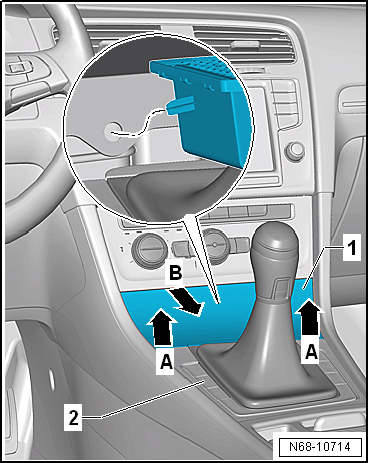
 Removing and installing trim for operating and display unit
Removing
–
Starting at bottom, unclip trim for operating and display
unit -1- from operating and display
unit -2- and remove it.
...
 Removing and installing centre console cover
Note
Removal and installation is described for the centre console
cover on driver side. Follow same instructions for the front
passenger side as approp ...
Other materials:
- Removing and installing front ashtray
- Removing and installing trim for operating and display unit
- Removing and installing centre console retainer, securing bracket and insulation for selector mechanism, e-Golf only
- Removing and installing mounting plate with retaining strap
- Removing and installing rear centre console trim