
Volkswagen Golf Mk7 Owners Manual: Seat heating
Fig. 53 shows the centre-console buttons for front seat heating in the Volkswagen Golf Mk7. Both cushions and, on some seat versions, the backrests can be heated electrically whenever the ignition is on. This page lists the specific conditions under which you should not switch the heating on — for people with reduced skin sensitivity, for example — to avoid burns.
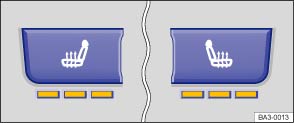
Fig. 53 In the centre console: buttons for the front seat heating
 First read and observe the introductory information
and safety warnings
First read and observe the introductory information
and safety warnings The seat cushions and backrests can be heated electrically when the ignition is switched on. Some seat versions have heated backrests.
Do not switch on the seat heating if one of the following conditions applies:
- The seat is not in use.
- The seat is fitted with a protective cover.
- A child seat is installed on the seat.
- The seat cushion is damp or wet.
- The interior or exterior temperature is above 25℃ (77°F).
| Function | Using the seat heating |
|---|---|
| Switching on | Press the  or or
 button. The seat heating is switched on at
the highest setting. All indicator lamps light up. button. The seat heating is switched on at
the highest setting. All indicator lamps light up. |
| Adjusting the heating output | Press the or
button repeatedly until the desired
heating level is set. |
| Switching off. | Press the or
button repeatedly until the indicator
lamps in the button go out. |

 WARNING
- Anyone experiencing reduced sensitivity to pain or temperature should never use the seat heating.
WARNING
- Ensure that the seat cushion is dry before the seat heating is used.
- Do not sit on the seat when wearing damp or wet clothing.
- Do not set any damp or wet objects or items of clothing on the seat.
- Do not spill any liquids on the seat.

 NOTICE
- To avoid damaging the heating elements, do not kneel on the seat or apply sharp pressure at a single point on the seat cushion and backrest.
- Liquids, sharp objects and insulating materials such as a protective cover or child seat on the seat could damage the seat heating.
- If the system starts to emit a smell, switch the seat heating off immediately and have it checked by a qualified workshop.

The seat heating should be switched off as soon as it is no longer needed. Otherwise fuel will be wasted.
Questions & answers
Seat heating — Volkswagen Golf Mk7

