
Volkswagen Golf Mk7 Owners Manual: Displays
Fig. 13 shows how the Volkswagen Golf Mk7 instrument cluster reports an open bonnet (A), open tailgate (B), open front-left door (C) or open right-rear door (D) on four-door models. Exactly which warnings and information messages appear, and in what format, depends on the vehicle's equipment level — this page explains the differences so you can interpret the open-door and open-bonnet symbols correctly on your own car.
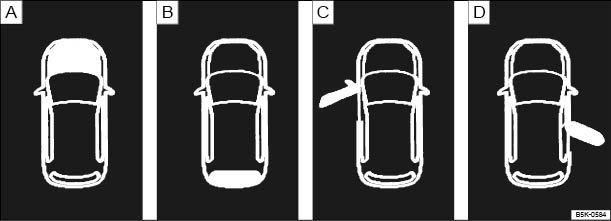
Fig. 13 A: bonnet open, B: tailgate open, C: front left door open, D: right rear door open (only in four-door vehicles)
 First read and observe the introductory information
and safety warnings
First read and observe the introductory information
and safety warnings The types of information displayed in the instrument cluster vary according to the vehicle's equipment level:
- Open doors, bonnet and tailgate
- Warning and information messages
- Mileage displays
- Time
- Radio and navigation information ⇒ BookletRadio, or ⇒ BookletNavigation system,
- Telephone information ⇒ BookletNavigation system, or ⇒ BookletRadio, navigation system,
- Outside temperature
- Compass display
- Selector lever positions
- Gear change indicator
- Driving data display (multifunction display (MFD)) and menus for various settings
- Service interval display
- Speed warning function
- Speed warning for winter tyres
- Start/stop system status display
- Status display for active cylinder management (ACT®)
- Traffic signs detected by the traffic sign recognition system
- Economical driving mode (eco)
- Engine code
- Vehicle battery charge level (SOC)
Open doors, bonnet and tailgate
The instrument cluster display indicates if any doors, or the bonnet or tailgate, are open once the vehicle has been unlocked, and while the vehicle is in motion. In some cases, an acoustic warning is also sounded. Different instrument cluster designs will have different displays.
| Legend for | See | |
|---|---|---|
| A |  Do not drive on! Do not drive on!
Bonnet open or not properly closed. |
|
| B | Do not drive on!
Tailgate open or not closed properly. |
|
| C, D | Do not drive on!
Vehicle door open or not properly closed. |
|
Warning and information messages
The system runs a check on certain components and functions in the vehicle when the ignition is switched on or while the vehicle is in motion. Malfunctions are indicated by red and yellow warning symbolsa) with text messages in the instrument cluster display . An acoustic warning is also sounded in certain cases. Different instrument cluster designs will have different displays.
In addition, a list of current malfunctions can be opened manually. To do so, choose Vehicle status or Vehicle in the selection menu .
| Type of message | Symbol coloura) | Explanation |
|---|---|---|
| Priority 1 warning report | Red | The symbol flashes or lights up – sometimes together
with an acoustic warning signal. Do not drive on! Danger!
Check function and resolve problem. Seek expert assistance if necessary. |
| Priority 2 warning report | Yellow | The symbol flashes or lights up – sometimes together
with an acoustic warning signal. If there is a fault, or if service fluids are running low, your vehicle could be damaged or break down . Check the fault as soon as possible. Seek expert assistance if necessary. |
| Information message | – | Information about various procedures within the vehicle. |
Mileage displays
The odometer registers the total distance travelled by the car.
The trip recorder (trip) shows the distance travelled since the trip recorder was last reset. The final digit shows distances of 100 m.
- Press button briefly to reset the trip recorder to 0.
Time
- To set the time, press and hold button while the doors are closed until the word Time appears in the display.
- Release the button. The time is shown in the display and the hour setting is marked.
- Then press the button repeatedly until the required hour is displayed. Press and hold the button to scroll through quickly.
- Once you have set the hour, wait until the minutes display is marked.
- Then press the button repeatedly until the required minute is displayed. Press and hold the button to scroll through quickly.
- Release the button to finish setting the clock.
You can also set the time in the infotainment system using the


 button and the
 and Time and date function buttons .
Outside temperature display
If the outside temperature falls below +4°C (+39°F), the display also shows a snowflake symbol (ice warning). This symbol remains lit up until the outside temperature rises above +6°C (+43°F) .
If the vehicle is stationary, the auxiliary heating ( ) is on or the vehicle is travelling at very low speeds, the temperature displayed may be slightly higher than the actual outside temperature due to heat radiated from the engine.
The measuring range lies between -45°C (-49°F) and +76°C (+169°F).
Compass display
When the ignition and navigation system are switched on, the instrument cluster display shows the current direction of travel.
Selector lever positions (automatic gearbox)
The gear selected is displayed on the side of the selector lever and on the display
in the instrument cluster. The display may show which gear has been selected if
the lever is in D S, or in Tiptronic
mode .
S, or in Tiptronic
mode .
Gear change indicator
While the vehicle is in motion, the instrument cluster may show which gear should be selected to reduce fuel consumption .
Speed warning for winter tyres
A display in the instrument cluster indicates when the set maximum speed has been exceeded .
Speed warning settings can be made and adjusted in the infotainment system using
the
button and the
and Tyres function buttons .
Start/stop system status display
The instrument cluster display shows information about the current status .
Economical driving mode (eco)
While driving the instrument cluster will display whether the vehicle is in economical mode as a result of active cylinder management (ACT®) or as a result of freewheeling of the automatic gearbox .
Vehicle battery charge level (SOC)
In some models, the battery charge level (SOC2)) is displayed as a percentage.
To display the charge level, press and hold button with the ignition switched off until SOC appears in the display.
Engine code
Press and hold button (for approximately 15 seconds) to show the vehicle's engine code in the display. The ignition should be switched on but the engine should not be running.

 WARNING
- Never ignore any illuminated warning lamps or text messages.
- Stop the vehicle as soon as possible and when safe to do so.
- Broken-down vehicles increase the risk of accidents both for you and for other road users. If necessary, switch on the hazard warning lights and set up the warning triangle to warn other road users.
- Stop the vehicle at a safe distance away from moving traffic and ensure that no part of the exhaust system can come into contact with any inflammable material underneath the vehicle, e.g. dry grass or fuel.
WARNING
- There may be black ice on the roads at outside temperatures above +4°C (+39°F) and also when no snowflake symbol is displayed as a black ice warning.
- You should never rely solely on the outside temperature display!

 NOTICE

a) Displayed in colour on an instrument cluster with colour display.
2) State of charge
Questions & answers
Displays — Volkswagen Golf Mk7

