VW Golf Mk7 manualsGolf Mk7 / manual

Volkswagen Golf Mk7 Service & Repair Manual: Removing and installing brake pedal

Note: the Volkswagen Golf Mk7 brake pedal cannot be removed on its own — this page explains that the entire pedal cluster/mounting bracket must be removed first.

It is not possible to remove the brake pedal separately.
–  To be able to remove it, pedal cluster/mounting bracket needs to be removed first → Chapter.
  Note
Removing brake pedal with mounting bracket removed
   
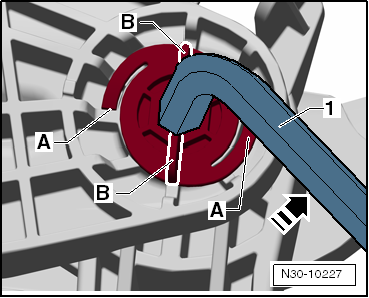
–  Turn pivot pin clockwise in direction indicated by -arrow-.
-1- = 14 mm hex socket wrench
  Note
This action will break off the tabs -B-. Renew the pivot pin.
–  Remove securing clip from pivot pin.
–  Pull out pivot pin towards right.
–  Remove brake pedal from mounting bracket.
Installing
Install in reverse order of removal, observing the following:
  Note
Renew pivot pin and securing clip.
  Note
Do not lubricate or grease the pivot pin. The pivot pin must remain dry.
–  Slide pivot pin from right to left through mounting bracket and brake pedal.
–  Fit securing clip to pivot pin when pivot pin has been inserted into both holes in mounting bracket.
 

Removing and installing brake pedal

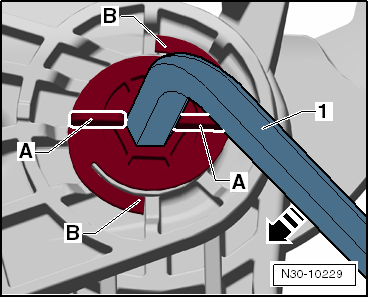
–  Turn pivot pin anti-clockwise in direction indicated by -arrow- until tabs -A- engage audibly on stop in mounting bracket.
–  Install pedal cluster/mounting bracket → Chapter.
 

Removing and installing brake pedal

    Questions & answers

    Removing and installing brake pedal — Volkswagen Golf Mk7

    How do I remove the Golf Mk7 brake pedal?
    Remove the mounting bracket, separate the pushrod, unbolt the pedal pivot and remove. Installation is the reverse.
    Connecting brake pedal to brake servo
      Hold ball head of plunger rod in front of mounting and push brake pedal in direction of brake servo, so that the ball head clicks into place. ...

    Brakes, hydraulics, regulator, servo
    ...