
Volkswagen Golf Mk7 Owners Manual: Parking using the Park Assist system
Fig. 158 shows Park Assist detecting a parallel (A) or perpendicular (B) space, and Fig. 159 shows the button to switch the system on manually in the Volkswagen Golf Mk7 centre console. This page gives the full preparation and parking sequence, including disabling traction control where required.
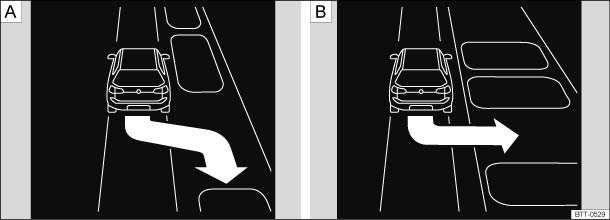
Fig. 158 Parking space detected. A: parallel parking, B: perpendicular parking

Fig. 159 In the lower section of the centre console: button for switching on the Park Assist system manually
 First read and observe the introductory information
and safety warnings
First read and observe the introductory information
and safety warnings Preparation for parking
- The traction control system (TCS) must be switched on .
- For parking spaces parallel to the road: press the
 button once while travelling
at a speed of up to approximately 40 km/h (25 mph). An indicator lamp lights
up in the button when the function is switched on.
button once while travelling
at a speed of up to approximately 40 km/h (25 mph). An indicator lamp lights
up in the button when the function is switched on.
- For parking spaces perpendicular to the road: press the
button twice while travelling
at a speed of up to approximately 20 km/h (12 mph). An indicator lamp lights
up in the button when the function is switched on.
- Press the button again to switch between the
parking modes, if necessary.
- Activate the turn signal for the side of the street on which you want to detect a parking space. The corresponding side of the street is shown on the instrument cluster display.
- A parking space is regarded as suitable if it is at least 0.8 m longer than the vehicle.
Parking
- When parking parallel to the road: drive past the parking space at a speed of no more than 40km/h (25 mph) and at a distance between approximately 0.5 m and 2 m from the parking space.
- When parking perpendicular to the road: drive past the parking space at a speed of no more than 20 km/h (12 mph) and at a distance between approximately 0.5 m and 2 m from the parking space.
- You will achieve best parking results if you stop your vehicle as parallel as possible to the parked vehicles or the edge of the road.
- If a suitable parking space is indicated in the instrument cluster display , stop the vehicle and, after a brief pause, select reverse gear.
- Follow the instructions in the instrument cluster display.
- Release the steering wheel when the following message is shown Steering intervent. active! Monitor the area around vehicle.
- Check the area around the vehicle and carefully depress the accelerator pedal – do not exceed 7 km/h (4 mph).
- The Park Assist system will only operate the steering wheel during the parking procedure. The driver operates the accelerator, clutch, gear shift and brake.
- Follow the visual instructions and the acoustic warning tones of the Park Assist system until the parking procedure has been completed.
- The Park Assist system will guide the vehicle when driving forwards and reversing until the vehicle is parked straight in the parking space.
- Wait until the steering has completed the steering procedure at the end of every parking movement in order to achieve an optimal parking result.
- A message is displayed on the instrument cluster once the parking procedure is completed and an acoustic signal tone may be heard.
Interrupting or automatically stopping the parking procedure
The Park Assist system will stop the parking procedure if the following happens:
- The button is pressed.
- The vehicle speed when parking is higher than approximately 7 km/h (4 mph).
- The driver operates the steering wheel.
- There is a system fault (system is temporarily unavailable).
- The TCS is switched off or the TCS or ESP starts to regulate.

The Park Assist system has system-related limitations. For example, the Park Assist system cannot help you to park the vehicle on tight bends.
When parking parallel to the road, a warning signal can be heard to tell the driver to switch between driving forwards and reversing because the change of direction should not take place in the permanent tone area of the ParkPilot.
The progress bar in the instrument cluster display will symbolically indicate the relative distance remaining.
If the Park Assist system turns the steering wheel when the vehicle is stationary,
the  symbol appears as well. Depress the brake pedal
so that the steering movement takes place with the vehicle stationary, keeping the
required number of parking movements to a minimum.
symbol appears as well. Depress the brake pedal
so that the steering movement takes place with the vehicle stationary, keeping the
required number of parking movements to a minimum.
If the parking result worsens after a wheel is changed, the system will first have to synchronise itself with the new wheel. The synchronisation procedure is carried out automatically while the vehicle is in motion. You can support this process by driving slowly (less than 20 km/h (12 mph)) through a bend, e.g. in an empty car park.
Questions & answers
Parking using the Park Assist system — Volkswagen Golf Mk7

