
Volkswagen Golf Mk7 Owners Manual: Button for the driver assist systems
Fig. 18 shows the dedicated button on the turn signal and main beam lever of the Volkswagen Golf Mk7 used to switch the driver assist systems listed in the Assistant menu on and off. This page explains exactly how to press it to toggle an individual system — such as Lane Assist or Front Assist — without navigating the full instrument-cluster menu tree.
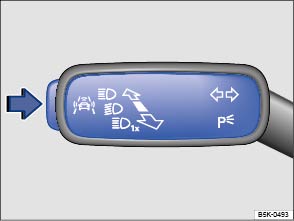
Fig. 18 On the turn signal and main beam lever: button for driver assist systems
 First read and observe the introductory information
and safety warnings
First read and observe the introductory information
and safety warnings You can switch the driver assist systems listed in the Assistant menu on and off with the button on the turn signal and main beam lever .
Switching individual driver assist systems on or off
- Press the button in the direction of the arrow to open the Assist systems menu.
- Select the driver assist system and switch it on or off . A tick indicates that a driver assist system is switched on.
- Mark and confirm your selection by pressing the button


 on the windscreen
wiper lever, or by pressing the
button on the multifunction steering wheel
.
on the windscreen
wiper lever, or by pressing the
button on the multifunction steering wheel
.
Driver assist systems can also be switched on and off in the infotainment system
by pressing the 

 button and the
 and Driver Assist function buttons
.
and Driver Assist function buttons
.
Questions & answers
Button for the driver assist systems — Volkswagen Golf Mk7

