
Volkswagen Golf Mk7 Owners Manual: Display and warning and indicator lamp
Fig. 163 shows the speed limiter status displays in the Volkswagen Golf Mk7 instrument cluster. This page explains each state — active with the stored speed in large digits, or inactive with the last speed shown smaller — so you can tell at a glance whether the limiter is currently enforcing a cap.
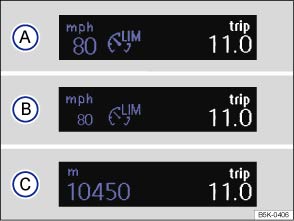
Fig. 163 In the instrument cluster display: speed limiter status displays
 First read and observe the introductory information
and safety warnings
First read and observe the introductory information
and safety warnings Speed limiter displays
Status :
 The speed limiter is active. The last
stored speed is displayed in large digits.
The speed limiter is active. The last
stored speed is displayed in large digits.  The speed limiter is inactive. The last
stored speed is shown in small digits or the display is darkened.
The speed limiter is inactive. The last
stored speed is shown in small digits or the display is darkened.  The speed limiter is switched off. The
total mileage is displayed.
The speed limiter is switched off. The
total mileage is displayed.
Warning and indicator lamp
| Lights up or flashes | Possible cause |
|---|---|
 |
Lit up: the speed limiter is switched on, active. |
| Flashing: the set speed of the speed limiter has been exceeded. |
Several warning and indicator lamps will light up briefly as a functional check when the ignition is switched on. They will switch off after a few seconds.

 WARNING
- Never ignore any illuminated warning lamps or text messages.

 NOTICE

Questions & answers
Display and warning and indicator lamp — Volkswagen Golf Mk7
What does the Golf Mk7 speed limiter display show?
The instrument cluster shows the stored maximum speed in large digits when active, or in smaller digits when the limiter is inactive but the speed is still stored.
Is there a warning if the Golf Mk7 speed limiter has a fault?
Yes. A warning symbol appears in the instrument cluster if the system detects a fault. The limiter may be unavailable until the fault is resolved.
How do I know the Golf Mk7 speed limiter is active?
The stored speed is displayed prominently and a status indicator in the instrument cluster confirms the limiter is regulating.

