
Volkswagen Golf Mk7 Owners Manual: Overview of the driver side
This driver side overview maps every control the driver reaches from the seat of the Volkswagen Golf Mk7 — the light switch, the turn signal and main beam lever, the windscreen wiper lever, the instrument cluster and the multifunction steering wheel with cruise control (CCS), Adaptive Cruise Control (ACC) and speed-limiter buttons. The layout is shown for both left-hand and right-hand drive Golf Mk7 models, and it also flags the ignition lock, the pedals, the steering-column adjustment lever and the driver knee airbag and front airbag housed in the dash panel. Use it as a quick map before diving into the detailed sections on lighting, wipers, the instrument cluster and the driver assist systems.
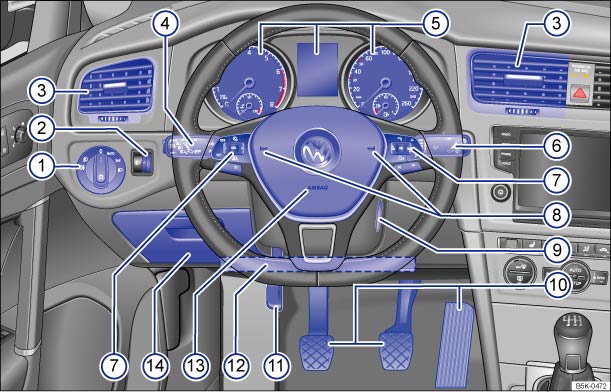
Fig. 5 Overview of the driver side (left-hand drive vehicles)
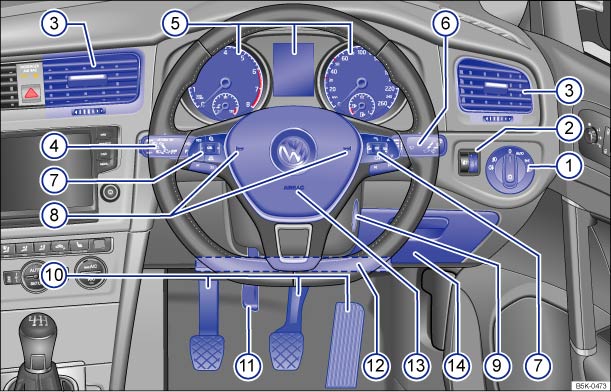
Fig. 6 Overview of the driver side (right-hand drive vehicles)
Key for and :
- Button for interior monitoring


Light switch

- Daytime running lights or daytime headlights

- Automatic headlight control


- Side light and dipped beam headlights
 ,
,

- Fog lights
 ,
,

- Daytime running lights or daytime headlights

Control for:
- Headlight range control

- Instrument and switch lighting

- Headlight range control
 Vent
Vent  –
–
 –
– 

Lever
- For main beam headlights

- Dipped beam headlights
- For headlight flasher
 x
x
- For turn signal

- For parking lights

- With switches and buttons for operating the cruise control system (CCS)
and the speed limiter
 –
– 

 –
–
 ,
,


 –
–  –
–
 ,
, 
- With button for driver assist systems

- For main beam headlights

Instrument cluster:
- Instruments
- Display
- Warning and indicator lamps

Lever for windscreen wipers and washers
- Windscreen wipers


 –
–

- Interval wipe for the windscreen
- Interval lengths or sensitivity of the rain sensor

- Windscreen wipers switched off
- Flick wipe x
- Windscreen wiper

- Wash and wipe system for the windscreen

- Rear wiper

- Wash and wipe system for the rear window

- Lever with buttons for operating the Volkswagen information system and
infotainment system
 ,
,

- Windscreen wipers

Controls on the multifunction steering wheel
- Buttons for operating the cruise control system (CCS) and the speed
limiter
,
,
 ,
,  ,
–
–
,
–
–
- Buttons for operating the Adaptive Cruise Control (ACC)
,
,
, ,
–
 –
–
- Volume setting for the radio, navigation announcements or a telephone
conversation
 –
–

- Buttons for operating the Volkswagen information system
 –
–
–
–  ,
,
 ,
, 
- Opening the main telephone menu or accepting a telephone call

- Activating voice commands

- Audio, navigation
 –
–

- Buttons for operating the cruise control system (CCS) and the speed
limiter
 Horn
Horn  Ignition lock
  Pedals
  Lever for adjusting the steering column
 Location of the knee airbag in the dash
panel
Location of the knee airbag in the dash
panel  Driver front airbag
  Stowage compartment
Questions & answers
Overview of the driver side — Volkswagen Golf Mk7

