
Volkswagen Golf Mk7 Owners Manual: Auto Hold function
Fig. 146 shows the Auto Hold button in the lower centre console of the Volkswagen Golf Mk7, its indicator lamp lighting when active. Once switched on, Auto Hold automatically prevents the car from rolling at a stop — in traffic or on a hill — without you holding the brake pedal, as this page explains.
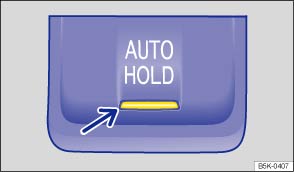
Fig. 146 In lower part of centre console: button for Auto Hold
 First read and observe the introductory information
and safety warnings
First read and observe the introductory information
and safety warnings The indicator lamp in the


 button (arrow)
lights up when the function is switched on.
button (arrow)
lights up when the function is switched on.
When switched on, the Auto Hold function automatically prevents the vehicle from rolling away without having to depress the foot brake.
The Auto Hold function holds the vehicle as soon as it detects that the vehicle
is not moving and the brake pedal is released. The green indicator lamp
 in the instrument cluster display showing that
the vehicle is being held on the electric parking brake will light up.
in the instrument cluster display showing that
the vehicle is being held on the electric parking brake will light up.
When the driver pulls away, the Auto Hold function releases the electronic parking
brake again. The green indicator lamp in
the instrument cluster display will go out again and the vehicle will start to move
in accordance with the incline of the road.
Requirements for holding the vehicle using the Auto Hold function:
- The driver door is closed.
- The driver is wearing a seat belt.
- The engine is running.
If any of the conditions for the Auto Hold function change while the vehicle
is stationary, the Auto Hold function will switch off automatically and the green
indicator lamp in the instrument cluster display
will go out, along with the yellow indicator lamp in the
button.
The electronic parking brake may close automatically to park the vehicle securely .
Switching Auto Hold on and off manually
Press the
button . The indicator lamp in the button
(arrow) goes out when the Auto Hold function is switched off.
Switching Auto Hold on and off automatically
If the Auto Hold function has been switched on using the
button before
switching the ignition off, the Auto Hold function switches on automatically when
the ignition is switched on the next time. The same applies if the Auto Hold function
is switched off – it will remain switched off when the ignition is switched on again.

 WARNING
- Never leave the vehicle if the engine is running and the Auto Hold function is switched on.
- Auto Hold cannot hold the vehicle in all hill start situations (e.g. if the ground is slippery or icy).

 NOTICE
Questions & answers
Auto Hold function — Volkswagen Golf Mk7

