
Volkswagen Golf Mk7 Owners Manual: General information
Fig. 155 shows the location of the reverse camera in the Volkswagen Golf Mk7 tailgate, and Fig. 156 shows the display it produces. This page distinguishes the system's behaviour on cars with and without the ParkPilot optical display, since the two work together but aren't identical.
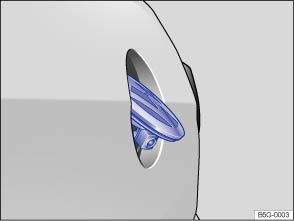
Fig. 155 In the tailgate: location of the camera for the reverse assist system (Rear Assist)
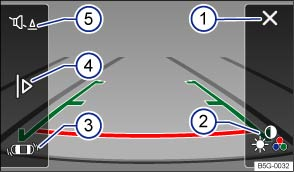
Fig. 156 Reverse assist system display
 First read and observe the introductory information
and safety warnings
First read and observe the introductory information
and safety warnings | Function | Action in vehicles without the ParkPilot optical display | Action in vehicles with the ParkPilot optical display |
|---|---|---|
| Switching on the display automatically. | Select reverse gear with the ignition switched on or the engine running. | |
| Switching the display off manually. | Press a function selection button on the radio or navigation system ⇒ BookletRadio, or ⇒ BookletNavigation system, . | |
OR: touch the  function button
on the screen. function button
on the screen. |
||
| OR: after switching off the ignition, the reverse assist system picture is switched off after a few seconds. | ||
Press the  button. button.
|
||
| Switching off the display by deselecting reverse gear. | The picture is switched off after approximately 8 seconds. | The system immediately switches to the optical display. |
| Switching off the display by driving forwards. | Drive forwards faster than approximately 10 km/h (6 mph). | Drive forwards faster than approximately 10 km/h (6 mph). |
Screen
If you move your hand towards the left or right-hand side of the screen, the following function buttons may appear (depending on equipment level) :
 Switch off the reversing camera image.
 Set display: brightness, contrast, colour
(in vehicles with a navigation device).
Set display: brightness, contrast, colour
(in vehicles with a navigation device).  Switch to the ParkPilot optical display
. To change back to the camera display, shift into reverse gear.
Switch to the ParkPilot optical display
. To change back to the camera display, shift into reverse gear.  Show or hide the mini ParkPilot display.
 Switch off the sound.
The Rear Assist system should not be used in the following situations:
- If the reversing camera is not providing a clear image, e.g. if visibility is poor because the lens is dirty.
- If the space behind the vehicle cannot be seen clearly or completely.
- If the rear of the vehicle is heavily loaded.
- If the driver is not familiar with the system.
- If the position or angle of the camera has changed, e.g. following a rear-end collision. The system should be checked by a qualified workshop.
Optical deception by the camera:
The reverse assist system camera only supplies two-dimensional images. Due to the lack of depth of field on the screen, potholes and dips in the ground, protruding parts on another vehicle or protruding objects on the ground may be difficult or impossible to see on the image.
Objects or other vehicles may appear closer or further away on the screen than they actually are.
- If you drive from a level surface onto an upward or downward slope.
- If you drive from an upward or downward slope onto a level surface.
- If the rear of the vehicle is heavily loaded.
- When approaching protruding objects. Such objects can leave the camera's field of vision while you are reversing.
Cleaning the camera lens
Keep the camera lens clean and free of ice and snow:
- Switch on the ignition.
- Switch on the electronic parking brake.
- Select reverse gear.
- Moisten the lens with a commercially available alcohol-based glass cleaner and clean the lens with a dry cloth .
- Remove snow with a brush.
- Remove ice with a de-icer spray .

 NOTICE
- Never use an abrasive cleaning product to clean the lens.
- Never use warm or hot water to remove snow and ice from the lens of the camera. This could damage the lens.

It is not possible to open the tailgate if the Volkswagen badge is folded out.
Volkswagen recommends that you practise parking with the reverse assist system in a traffic-calmed area or car park with good vision and weather conditions, so you can familiarise yourself with the system and the orientation lines in a safer environment.
The reverse assist system cannot be switched on if the tailgate is open.
Questions & answers
General information — Volkswagen Golf Mk7

