
Volkswagen Golf Mk7 Owners Manual: Electronic parking brake
Fig. 141 shows the button for the electronic parking brake in the lower centre console of the Volkswagen Golf Mk7, which replaces the traditional handbrake lever entirely. This page explains how to switch it on at a stop and the conditions under which it can be applied.
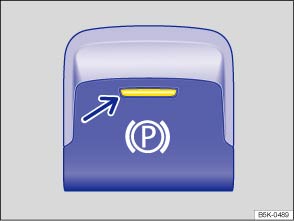
Fig. 141 In lower part of centre console: button for the electronic parking brake
 First read and observe the introductory information
and safety warnings
First read and observe the introductory information
and safety warnings The electronic parking brake replaces the handbrake.
Switching on the electronic parking brake
The electronic parking brake can be switched on at any time when the vehicle is stationary. Even when the ignition is switched off, always switch on the electronic parking brake when leaving or parking the vehicle.
- Pull and hold the
 button .
- The electronic parking brake is switched on when the indicator lamp in the
button (arrow) and the red indicator lamp
in the instrument cluster display are lit
up .
- Release the button.
Switching off the electronic parking brake
- Switch on the ignition.
- Press the button. At the same
time depress the brake pedal with some force or depress the accelerator pedal
slightly when the engine is running.
- The indicator lamp in the button (arrow) and the red indicator
lamp in the instrument cluster will go out.
Automatic switch-off for the electronic parking brake when driving off
The electronic parking brake switches off automatically when the vehicle pulls away, provided that the driver door is closed and the driver seat belt has been fastened. If the vehicle has a manual gearbox, you must also depress the clutch fully before pulling off so that the system detects that you want to switch off the parking brake.
You can prevent the electronic parking brake from switching off automatically
by pulling and holding the button while pulling
away.
Automatic switch-on of the electronic parking brake if not activated properly when the driver leaves the vehicle
In vehicles with an automatic gearbox the electronic parking brake switches itself on when leaving the vehicle in the following circumstances:
- When the vehicle is in gear positions D, S or R, or if the selector lever is in the Tiptronic position
- When the ignition is switched on
- When the vehicle is stationary
- If the driver door is open.
Emergency braking function
The emergency braking function should only be used in those situations where the vehicle cannot be stopped using the foot brake !
- Pull and hold the button to brake the
vehicle sharply. An acoustic signal can be heard at the same
time.
- To stop the braking procedure, release the
button or depress the accelerator pedal.

 WARNING
- The electronic parking brake should never be used to brake the vehicle, except in emergencies. The braking distance is considerably longer as only the rear wheels are braked. Always use the foot brake.
- Never activate the accelerator from the engine compartment if a position or gear has been selected and the engine is running. The vehicle could move, even if the electronic parking brake is applied.

 NOTICE

Questions & answers
Electronic parking brake — Volkswagen Golf Mk7

