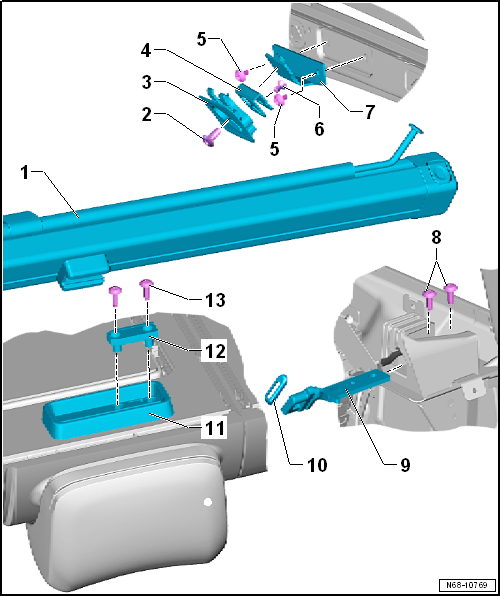
- Removing and installing
→ Chapter
| 3 - |
Remove fitting eye trim |
- Allocation
→ Electronic Parts Catalogue
- Removing and installing
→ Chapter
| 4 - |
Eyelet for net partition |
- Removing and installing
→ Chapter
- Allocation
→ Electronic Parts Catalogue
- Removing
| – |
Remove moulded headliner
→ Chapter. |
| – |
Unscrew bolts -5- and remove bracket
for eyelet. |
- → Chapter „Assembly overview - rear outer three-point seat belt“
| 9 - |
Bracket for net partition |
- Removing and installing
→ Chapter
- Slide over bracket for net partition, and insert in luggage compartment
side trim
- On right rear seat backrest (2/3)
- Removing and installing
→ Chapter
- Removing and installing
→ Chapter
 Note
Note
-
| |
Clean remnants of locking fluid from thread with a wire
brush. Then, fit bolts using locking fluid (
→ Electronic Parts Catalogue ). |
-
| |
Also clean locking fluid from threaded holes (e.g. using
thread chaser). |
Questions & answers
Assembly overview- net partition — Volkswagen Golf Mk7
What does the Golf Mk7 net partition assembly show?
The net partition, mounting bolt (4.5 Nm), fitting eye trim and anchor points.
Note
The assembly overview is shown for the driver side. The assembly
overview for the front passenger side is analogous.
1 -
Sun visor
...


