
Volkswagen Golf Mk7 Owners Manual: Using the selection menu in the instrument cluster
There are two ways to drive the Volkswagen Golf Mk7's instrument-cluster menus. Fig. 16 shows cars without a multifunction steering wheel: button ① on the windscreen wiper lever confirms a menu item, and rocker switch ② scrolls between menus and information displays. Fig. 17 shows the equivalent controls on the right-hand side of the multifunction steering wheel for cars that have one. Both methods reach the same driving-data and assist-systems menus.
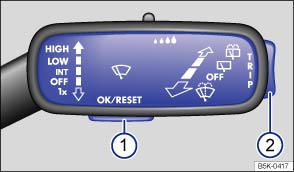
Fig. 16 Vehicles without a multifunction steering wheel: button ① on the windscreen wiper lever for confirming menu points, and rocker switch ② for changing menus and information displays
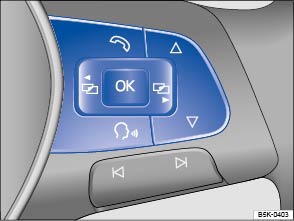
Fig. 17 Right-hand side of the multifunction steering wheel: controls for using the menus and information displays in the instrument cluster
 First read and observe the introductory information
and safety warnings
First read and observe the introductory information
and safety warnings Opening the selection menu and selecting the menu or information display
- Switch on the ignition.
- If a message or vehicle pictogram is displayed, press button on the
windscreen wiper level or the

 button on the multifunction steering wheel
. You may need to press the button several times.
button on the multifunction steering wheel
. You may need to press the button several times.
- Operation using the windscreen wiper lever: to display the selection menu or to return to the selection menu from another menu or information display, press and hold the rocker switch until the selection menu is displayed. To browse through the selection menu, press the rocker switch up or down.
- Operation using the multifunction steering wheel: to display
and browse through the selection menu, press
 or
or
 .
.
- To open the menu or information display shown in the selection menu,
press on the windscreen wiper lever, press the
button
on the multifunction steering wheel , or wait until the menu or information
display opens automatically after a few seconds.
Adjusting settings in menus
- In the displayed menu, press the rocker switch on the windscreen wiper
lever up or down, or press the arrow buttons
 or
or  on the multifunction steering wheel until the required menu option is selected.
A frame appears around the selected option.
on the multifunction steering wheel until the required menu option is selected.
A frame appears around the selected option.
- Press button on the windscreen wiper lever or press the
button
on the multifunction steering wheel to make the required change. A tick indicates
that the particular system or function is active.
Returning to the selection menu
- Using the menu: in the menu, select the Back menu option to leave the menu.
- Using the multifunction steering wheel: press the
or
button .

If warning messages about malfunctions are displayed when the ignition is switched on, it may not be possible to adjust some settings as described, or the information display may appear differently. If this is the case, take the vehicle to a qualified workshop to have the malfunction rectified.
Questions & answers
Using the selection menu in the instrument cluster — Volkswagen Golf Mk7

