| – |
Fold down both rear seat backrests. |
| – |
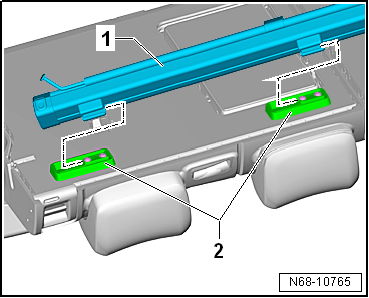
Pull net partition -1- towards
right out of mountings -2- on right
rear seat backrest (2/3), and remove it. |
| – |
Insert guides of net partition -1-
into mountings -2- on right rear
seat backrest (2/3). |
| – |
Push net partition towards left into mountings
-2- on right rear seat backrest
(2/3) as far as it will go. |
|
|
 |
Questions & answers
Removing and installing net partition — Volkswagen Golf Mk7
How do I remove the Golf Mk7 luggage net partition?
Fold both rear backrests, pull the net right out of its mountings on the rear seat backrest, and remove.
Note
The assembly overview is shown for the front left roof grab
handle. The assembly overview for the remaining roof grab handle is
analogous.
1 -&nb ...
Removing
–
Remove net partition
→ Chapter.
–
Re ...


