
Volkswagen Golf Mk7 Owners Manual: Parking
Fig. 157 shows the static orientation lines the Volkswagen Golf Mk7 reversing camera projects for the parking space behind the car — the green zone ends around 2 metres behind the vehicle. This page explains what each coloured zone in the orientation aid means in practice.
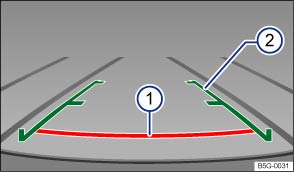
Fig. 157 On the screen: static orientation lines for the parking space behind the vehicle
 First read and observe the introductory information
and safety warnings
First read and observe the introductory information
and safety warnings Overview of the orientation aid
The displayed green area ends on the road around 2 metres behind the vehicle.
Meaning of the orientation lines on the screen 1)
 Safe distance: area up to approximately
40 cm on the road behind the vehicle.
Safe distance: area up to approximately
40 cm on the road behind the vehicle.  Projection of the vehicle (widened somewhat)
toward the rear. The middle markers are approximately one metre behind the vehicle
on the pavement.
Projection of the vehicle (widened somewhat)
toward the rear. The middle markers are approximately one metre behind the vehicle
on the pavement.
Parking
- Position the vehicle in front of a parking space and engage reverse gear.
- Reverse slowly and steer the vehicle so that the green orientation lines lead into the parking space .
- Position the vehicle in the parking space so that the green orientation lines are parallel to the parking space.
1) All references to the length of orientation lines apply to a vehicle that is standing on a horizontal surface.
Questions & answers
Parking — Volkswagen Golf Mk7
What do the orientation lines on the Golf Mk7 Rear Assist screen mean?
The green zone ends roughly 2 metres behind the car. Yellow indicates the intermediate zone, and red marks the area closest to the bumper. Side lines show the vehicle width projected rearward.
Are the Golf Mk7 Rear Assist parking lines static or dynamic?
On models with a dynamic display, the lines curve as you turn the steering wheel. On basic models, the lines are static and show only straight-back guidance.
Does the Golf Mk7 camera image match what I see in the mirror?
The camera gives a wider-angle view than the mirror and the image is un-mirrored (left in the image is left behind the car). This can take a moment to get used to.

