VW Golf Mk7 manualsGolf Mk7 / manual

Volkswagen Golf Mk7 Service & Repair Manual: Detaching fibre optic cable from cable harness connector

This page covers detaching a fibre optic connector from its control unit — release the primary locking mechanism by pressing it, then the secondary locking mechanism.

Removing
–  Pull fibre optic cable connector off the relevant control unit.
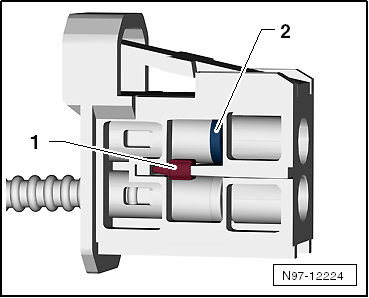
–  Release the locking mechanism in fibre optic cable connector -1- by pressing it.
–  Release secondary locking mechanism -2-, using a small screwdriver.
–  Remove fibre optic cable.
  Caution
Use protective caps from the case in order to protect the fibre optic cable against dust and dirt.
Use a new housing, as the secondary locking mechanism can be damaged when the fibre optic cable is removed.
Take note of the arrows on the basic module for the assignment of “IN” and “OUT”.
Installing
Carry out installation in the reverse sequence observing the following:
–  Install fibre optic cable in accordance with markings.
  Note
Push corrugated tube into plug-in housing until it engages audibly.
 

Detaching fibre optic cable from cable harness connector

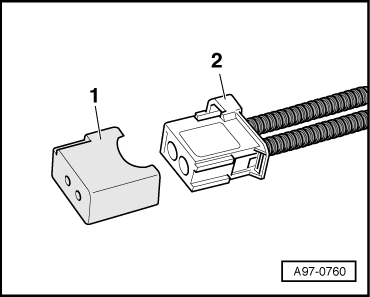
Seal the open plug-in connection -2- for fibre optic cable with the protective cap for cable harness connector -VAS 6223/9--item 1-.
The protective cap prevents soiling and mechanical damage at the cross-cut end of the fibre optic cable so that the transmission of light is not impaired.
 

Detaching fibre optic cable from cable harness connector

    Questions & answers

    Detaching fibre optic cable from cable harness connector — Volkswagen Golf Mk7

    How do I detach a Golf Mk7 fibre optic cable from its connector?
    Use the specific release tool to press the locking tab and pull the fibre out. Do not twist or pull at an angle.
    Preparing fibre optic cable
    Special tools and workshop equipment required     Fibre optic cable repair kit -VAS 6223A- ...

    Repair set, aerial cable VAS 6720
    Checking the aerial wire: → Anchor Changing tool adapter: → Anchor Cutting aerial wire: U ...