
Volkswagen Golf Mk7 Owners Manual: Vents
Fig. 184 shows the vents in the Volkswagen Golf Mk7 dash panel. The manual recommends leaving them open to ensure the cabin is properly heated, ventilated and cooled — this page explains how to adjust each vent's thumb wheel to direct or close off airflow individually.
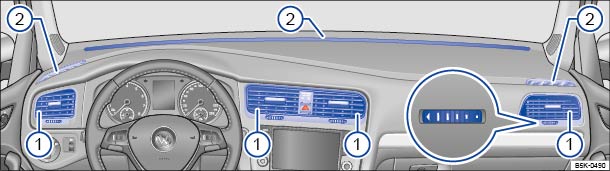
Fig. 184 In the dash panel: vents
 First read and observe the introductory information
and safety warnings
First read and observe the introductory information
and safety warnings Vents
The vents should be left open to ensure that the vehicle interior is sufficiently heated, ventilated and cooled.
- Turn the relevant thumb wheel (magnified view) in the required direction
to open and close the vents. The vent is closed when the thumb wheel is in position
 .
.
- Adjust the direction of the airflow by moving the grille.
Additional vents can be found in the instrument panel , in the footwells and in the rear area of the vehicle interior.

 NOTICE

Questions & answers
Vents — Volkswagen Golf Mk7
Where are the vents on the Golf Mk7?
Two on either side of the dash centre panel, one at each end of the dash (driver and passenger), and (on some models) rear vents in the back of the centre console.
How do I close a Golf Mk7 vent?
Turn the thumb wheel on the vent to the closed position. This cuts off airflow through that vent without affecting the others.
Should I keep all Golf Mk7 vents open?
Yes. The manual recommends leaving all vents open to ensure even heating, ventilation and cooling throughout the cabin. Closing too many vents reduces system efficiency.

