
Volkswagen Golf Mk7 Owners Manual: Operating Adaptive Cruise Control (ACC)
Fig. 169 shows the multifunction steering wheel buttons for operating Adaptive Cruise Control on the Volkswagen Golf Mk7. A green indicator lamp confirms the system is switched on and ready — this page walks through setting the speed and following distance from there.
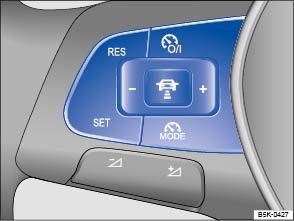
Fig. 169 Left-hand side of the multifunction steering wheel: buttons for operating the Adaptive Cruise Control (ACC)
 First read and observe the introductory information
and safety warnings
First read and observe the introductory information
and safety warnings When the Adaptive Cruise Control (ACC) is switched on,
the green indicator lamp  in the instrument cluster
lights up, and the speed memory and the status of the Adaptive Cruise Control are
shown in the display .
in the instrument cluster
lights up, and the speed memory and the status of the Adaptive Cruise Control are
shown in the display .
Conditions for starting the Adaptive Cruise Control
- The selector lever must be in position D or S or be in the Tiptronic gate. A forward gear, but not 1st gear, must be selected in the manual gearbox.
- In vehicles with a manual gearbox, the actual speed should be minimum 30 km/h (18 mph) if no speed is stored.
Controlling speed
When switched on, the speed can be stored and set. The stored speed can vary from the speed actually being driven if the distance is being actively controlled.
| Function | Button on the multifunction steering wheel | Action |
|---|---|---|
| Switching on the ACC. | Press the  button on
the multifunction steering wheel. button on
the multifunction steering wheel. |
The system is switched on. No speed has yet been stored and the speed is not yet being controlled. |
| Switching between the ACC and the speed limiter. | Press the  button on
the multifunction steering wheel. button on
the multifunction steering wheel. |
This switches between the CCS and the speed limiter . |
| Activating the ACC. | Press the 
  button on
the multifunction steering wheel. button on
the multifunction steering wheel. |
Current speed is stored and controlled. If ACC is already active: Press briefly: reduce speed by 1 km/h (1 mph) and store. Press and hold: the stored speed is reduced continuously in steps of 1 km/h (1 mph) for as long as the button is pressed. A reduction in speed is achieved by accelerator release or automatic braking. |
| Switching off ACC temporarily. | Press the button on
the multifunction steering wheel. OR: depress the brake pedal. OR: depress the clutch pedal for longer than 30 seconds. |
Control is switched off temporarily. The speed is stored in the memory. |
| Resuming ACC control. | Press the  button on
the multifunction steering wheel.
button on
the multifunction steering wheel. |
The stored speed is reactivated and controlled. If no speed has been stored yet, the ACC records and controls the actual speed. If ACC is already active: Press briefly: increase speed by 1 km/h (1 mph) and store. Press and hold: the stored speed is increased continuously in steps of 1 km/h (1 mph) for as long as the button is pressed. |
| Accelerating (during ACC control). | Press the  button on the
multifunction steering wheel. button on the
multifunction steering wheel. |
Press briefly: increase speed in increments of
10 km/h (5 mph) and store. Press and hold: the stored speed will be increased in steps of 10 km/h (5 mph) for as long as the button is pressed. |
| Decelerating (during ACC control). | Press the  button on the
multifunction steering wheel. button on the
multifunction steering wheel. |
Press briefly: reduce speed in increments of
10 km/h (5 mph) and store. Press and hold: the stored speed will be reduced in steps of 10 km/h (5 mph) for as long as the button is pressed. A reduction in speed is achieved by accelerator release or automatic braking. |
| Switching off the ACC. | Press the button on
the multifunction steering wheel. |
The system is switched off. The stored speed will be deleted. |
The mph figures given in brackets in the table relate exclusively to instrument clusters with mile readings.
Stop-and-go traffic and the vehicle automatically pulling away
If the ACC ready for start driver message is displayed in the instrument cluster
and the vehicle ahead starts to move, the vehicle will also pull away. ACC ready
for start can be reactivated or extended by pressing the
button . It is displayed for approximately 3 seconds.
If ACC ready for start is no longer displayed, the vehicle will not start automatically,
e.g. with active start/stop system. If the vehicle ahead has already moved on, you
can pull off by pressing the
button or by depressing
the accelerator briefly. The ACC then continues regulating.
Automatic pulling away is not available for all vehicles and countries.
Setting the distance level
The speed-dependent distance from the vehicle in front can be set to one of 5 levels in the infotainment system .
In wet road conditions, you should always set a larger distance than when driving in dry road conditions.
The following distances can be pre-selected:
- Very small
- Small
- Medium
- Large
- Very large
The distance level to the vehicle ahead is set using the
 button on the multifunction steering wheel . The
ACC display appears when the button is pressed . To set the distance level, press
the button.
button on the multifunction steering wheel . The
ACC display appears when the button is pressed . To set the distance level, press
the button.
When the highest level is reached, the distance returns to the lowest level when the button is pressed again.
The distance level can also be set using the or
buttons on the multifunction steering wheel immediately
after the button on the multifunction steering wheel
has been pressed.
The 

 button and the
  and
Driver assistance function buttons in the infotainment system can be used to set
the distance level that should be selected when the ACC is switched on .
and
Driver assistance function buttons in the infotainment system can be used to set
the distance level that should be selected when the ACC is switched on .
Setting the driving programme
In vehicles with Driving Mode Selection, the selected driving mode (Driving Mode Selection) can affect the acceleration response .
The following driving modes can be selected:
- Normal
- Sport
- Eco
In vehicles without Driving Mode Selection, the acceleration response can be
affected by the driving mode selected by pressing the
button and the and
Driver assistance function buttons in the infotainment system .
The following conditions can prevent the Adaptive Cruise Control (ACC) from reacting:
- If the accelerator is depressed.
- If no gear is selected.
- If the ESC is taking corrective action.
- If the driver has not fastened seat belt.
- If there is a fault in several brake lights on the vehicle or on a trailer with an electrical connection to the vehicle.
- If the vehicle is reversing.
- If the vehicle is travelling faster than approximately 160 km/h (100 mph).

 WARNING
- The ACC may not be able to recognise all driving situations correctly.
- Leaving your foot on the accelerator will mean that the ACC will not brake automatically. This is because manual acceleration overrides the system.
- You should always be prepared to brake the vehicle yourself.
- Observe country-specific regulations regarding the minimum distance.

The set speed will be deleted if the ignition or the ACC is switched off.
The ACC is automatically deactivated when the traction control system (TCS) is deactivated.
In vehicles with a start/stop system, the engine is switched off automatically during the stationary phase of ACC and is then restarted for moving off.
Questions & answers
Operating Adaptive Cruise Control (ACC) — Volkswagen Golf Mk7

