
Volkswagen Golf Mk7 Owners Manual: Vehicle path display
Fig. 152 and Fig. 153 show the vehicle path display without and with steering input on the Volkswagen Golf Mk7's colour screen. The yellow segment represents a detected obstacle in the car's predicted path — this page explains how the dynamic guide lines bend as you turn the wheel.
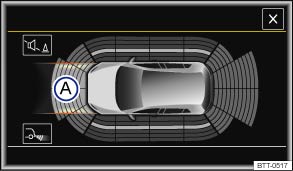
Fig. 152 Vehicle path display without steering input (colour display)
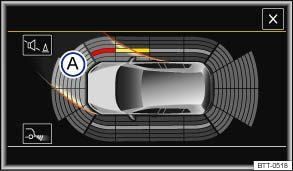
Fig. 153 Vehicle path display with steering input (colour display)
 First read and observe the introductory information
and safety warnings
First read and observe the introductory information
and safety warnings | Key | |
|---|---|
| and | Meaning |
| Ⓐ | Vehicle path displaya). |
 |
The yellow segment represents an obstacle in the vehicle’s path. |
 |
The red segment represents an obstacle located in the vehicle’s collision area. |
 |
The grey segment represents an obstacle outside of the vehicle's path. |
Vehicle path display
| Function | What to do when the ignition is switched on |
|---|---|
| Front vehicle path display | Forward gear engaged. |
| OR: move the gear lever to neutral, or move the selector lever to N. | |
| OR: depending on the vehicle equipment level, roll forwards. | |
| Rear vehicle path display | Select reverse gear or move the selector lever to position R. |
| OR: depending on the vehicle equipment level, roll backwards. |
The vehicle path display changes in relation to the steering input. Obstacles that are located in the vehicle's path during a steering input are displayed in yellow and red segments.
Obstacles that are no longer located in the vehicle's path after a steering input are displayed as follows:
- The segments are shown in red when the distance to an obstacle is less than approximately 30 cm.
- The segments are shown in grey when the distance to an obstacle is greater than approximately 30 cm.
- All segments are displayed in grey and the vehicle path display is hidden when the electronic parking brake is closed.
- All segments are displayed in grey and the vehicle path display is hidden when the selector lever is in position P and the ParkPilot is activated.
Towing a trailer
The vehicle path display is not shown when towing a trailer.

 NOTICE
- The segments are no longer displayed in relation to the steering input and the vehicle path display is hidden.
a) The area around the vehicle is not shown in vehicles with 4 ultrasound sensors in each bumper, front or rear.
Questions & answers
Vehicle path display — Volkswagen Golf Mk7

