
Volkswagen Golf Mk7 Owners Manual: Stowage compartment in the front centre console
Fig. 111 shows the stowage compartment in the Volkswagen Golf Mk7 front centre console. A brief press on the cover opens it; pushing the cover down as far as it will go closes it again — this page also notes what the compartment may contain, depending on equipment.
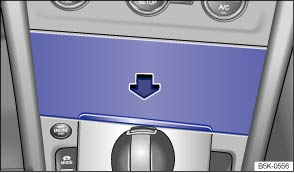
Fig. 111 In the centre console: stowage compartment
 First read and observe the introductory information
and safety warnings
First read and observe the introductory information
and safety warnings To open, briefly press the cover of the stowage compartment (arrow).
To close, push the stowage compartment cover down as far as it will go.

The stowage compartment may contain the factory-fitted USB socket
 , the AUX-IN socket
 or the multimedia socket (MEDIA-IN) ⇒ BookletRadio,
or ⇒ BookletNavigation system, .
or the multimedia socket (MEDIA-IN) ⇒ BookletRadio,
or ⇒ BookletNavigation system, .
Questions & answers
Stowage compartment in the front centre console — Volkswagen Golf Mk7
Where is the Golf Mk7 centre console stowage compartment?
In the front centre console ahead of the gear lever. Press the cover briefly to pop it open; press it down again to close.
What connections might be inside the Golf Mk7 centre console compartment?
Depending on specification, you may find a USB port, AUX-IN socket or MEDIA-IN connection for your phone or media player.
Can I charge my phone in the Golf Mk7 centre console compartment?
Yes, if a USB port is fitted. Some models also offer wireless Qi charging in this area (or in the front armrest compartment).

